

🔌 Configuration
To connect Windsurf with SimpleTool Server, you need to configure the MCP connection in Windsurf’s configuration file.📁 Step 1: Locate the MCP Configuration File
The MCP configuration file is typically located at: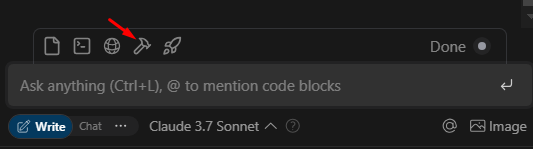

⚙️ Step 2: Configure the SSE Connection
Add the SimpleTool Server as an MCP server in your configuration file. You’ll need to specify:- A server name
- The server URL (pointing to your SimpleTool Server’s MCP SSE endpoint)
- The transport type (SSE)
localhost with the IP address or hostname of your SimpleTool Server.
✅ Step 3: Verify the Connection
After configuring the MCP connection, hitRefresh in your Windsurf application to apply the changes. You should now be able to access SimpleTool’s MCP Tools through Windsurf.
🧰 Available Tools
Once connected, Windsurf will have access to all the tools enabled in your SimpleTool Server. These may include:- 🌐 Web browsing capabilities
- 🔄 HTTP request tools
- ⏰ Time conversion utilities
- 📚 Documentation search
- 🔍 And more, depending on your SimpleTool Server configuration
🔍 Troubleshooting
If you encounter issues with the integration:- 🔄 Verify that your SimpleTool Server is running and accessible
- 🔗 Check that the server URL in your MCP configuration is correct
- 🚢 Ensure the transport type is set to “sse”
- 🧱 Check if any firewalls are blocking the connection